Database Models: Relational, Network, Hierarchical, Object-Oriented
Database models have evolved over decades to meet changing requirements. Understanding different database models—from hierarchical trees to relational tables to object-oriented structures—provides insights into why certain designs work better for specific applications and how modern databases address complex data management challenges.
The Basics
A database model defines the logical structure of a database and determines how data can be stored, organized, and manipulated.
Evolution of Database Models:
1. Hierarchical Model (1960s-1970s)
- Tree-like structure
- Parent-child relationships
- One-to-many (1:N) only
2. Network Model (1970s)
- Graph-based structure
- Many-to-many (M:N) supported
- More flexible than hierarchical
3. Relational Model (1970-present)
- Table-based structure
- Dominant model today
- Flexible and powerful
4. Object-Oriented Model (1980s-present)
- Objects with properties and methods
- Inheritance and encapsulation
- Complex data types
Technical Details
1. HIERARCHICAL MODEL:
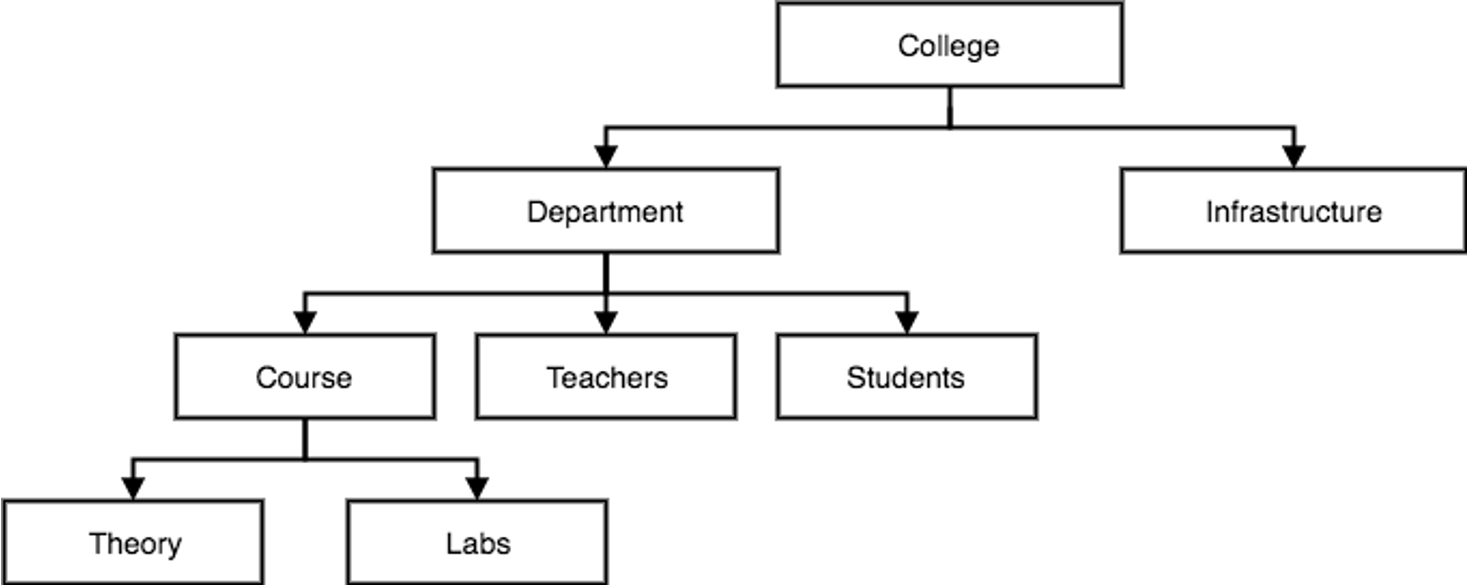
Structure:
- Tree-like hierarchy with parent-child relationships
- Single root for each tree
- Each child has exactly one parent
Characteristics:
- One-to-many (1:N) relationships only
- Navigation through explicit paths
- Fast retrieval along predefined paths
Example: IMS (Information Management System) by IBM
Advantages:
- Simple and easy to understand
- Fast performance for hierarchical queries
- Data integrity through parent-child links
Limitations:
- Cannot handle many-to-many relationships efficiently
- Data redundancy when representing complex relationships
- Limited query flexibility
- Difficult reorganization
Example Structure:
        University
           |
    ┌──────┴──────┐
    │             │
Department    Department
    │             │
┌───┴───┐     ┌───┴───┐
│       │     │       │
Student Student Student Student
2. NETWORK MODEL:
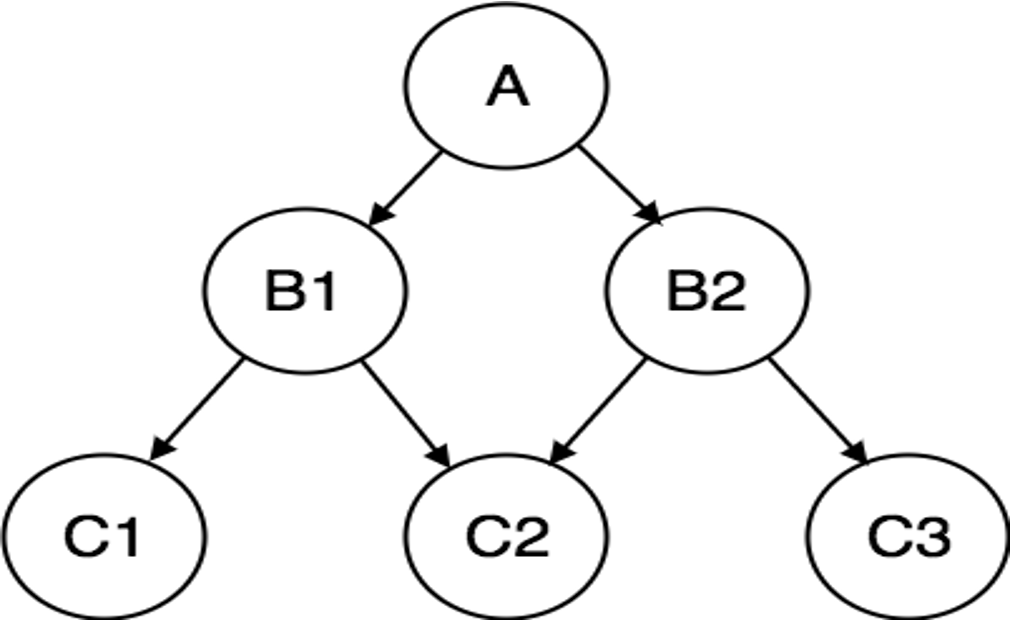
Structure:
- Graph-based with records (nodes) and sets (edges)
- Records connected through pointers
- CODASYL (Conference on Data Systems Languages) standard
Characteristics:
- Many-to-many (M:N) relationships supported
- Set construct for 1:N relationships
- More flexible than hierarchical
Example: IDMS (Integrated Database Management System)
Advantages:
- More flexible relationship representation
- Better for complex queries
- Can represent M:N relationships
- Faster access than hierarchical for some queries
Limitations:
- Complex navigation logic
- Difficult to modify structure
- Application programs tightly coupled with database structure
- Steep learning curve
Example Structure:
    Student ──── enrolls ──── Course
       │                         │
   belongs to                teaches
       │                         │
    Department ──── has ───── Instructor
3. RELATIONAL MODEL:
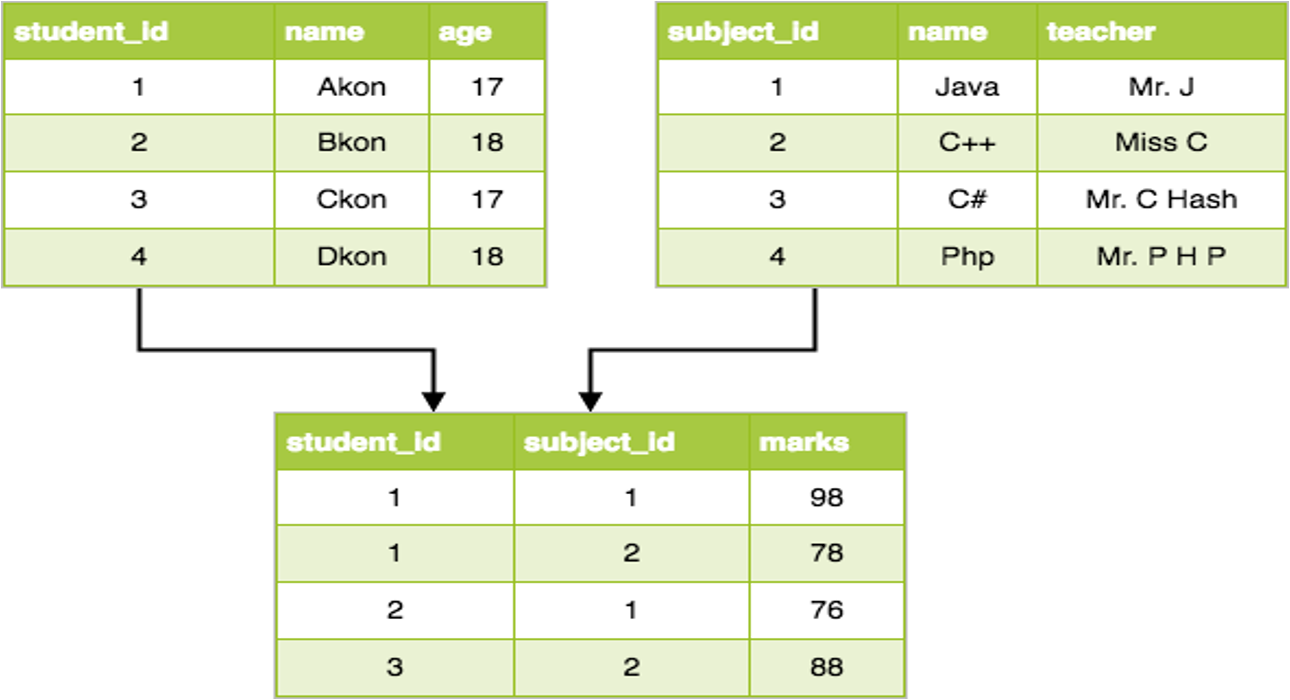
Foundation: E.F. Codd's relational model (1970)
Structure:
- Data organized in tables (relations)
- Rows (tuples) represent records
- Columns (attributes) represent fields
Core Concepts:
- Relation: Table with rows and columns
- Domain: Set of allowed values for an attribute
- Primary Key: Unique identifier for tuples
- Foreign Key: Reference to primary key in another relation
Characteristics:
- Simple tabular structure
- Data independence (logical and physical)
- Declarative query language (SQL)
- Mathematical foundation (relational algebra/calculus)
- ACID properties (Atomicity, Consistency, Isolation, Durability)
Advantages:
- Structural independence: Changes in structure don't affect applications
- Ad hoc query capability: Flexible data retrieval
- Data integrity through constraints
- Normalization reduces redundancy
- Standard query language (SQL)
Examples: MySQL, PostgreSQL, Oracle, SQL Server, DB2
Relational Algebra Operations:
- Selection (σ): Filter rows
- Projection (π): Select columns
- Join (⋈): Combine tables
- Union (∪): Combine result sets
- Difference (−): Subtract result sets
4. OBJECT-ORIENTED MODEL:
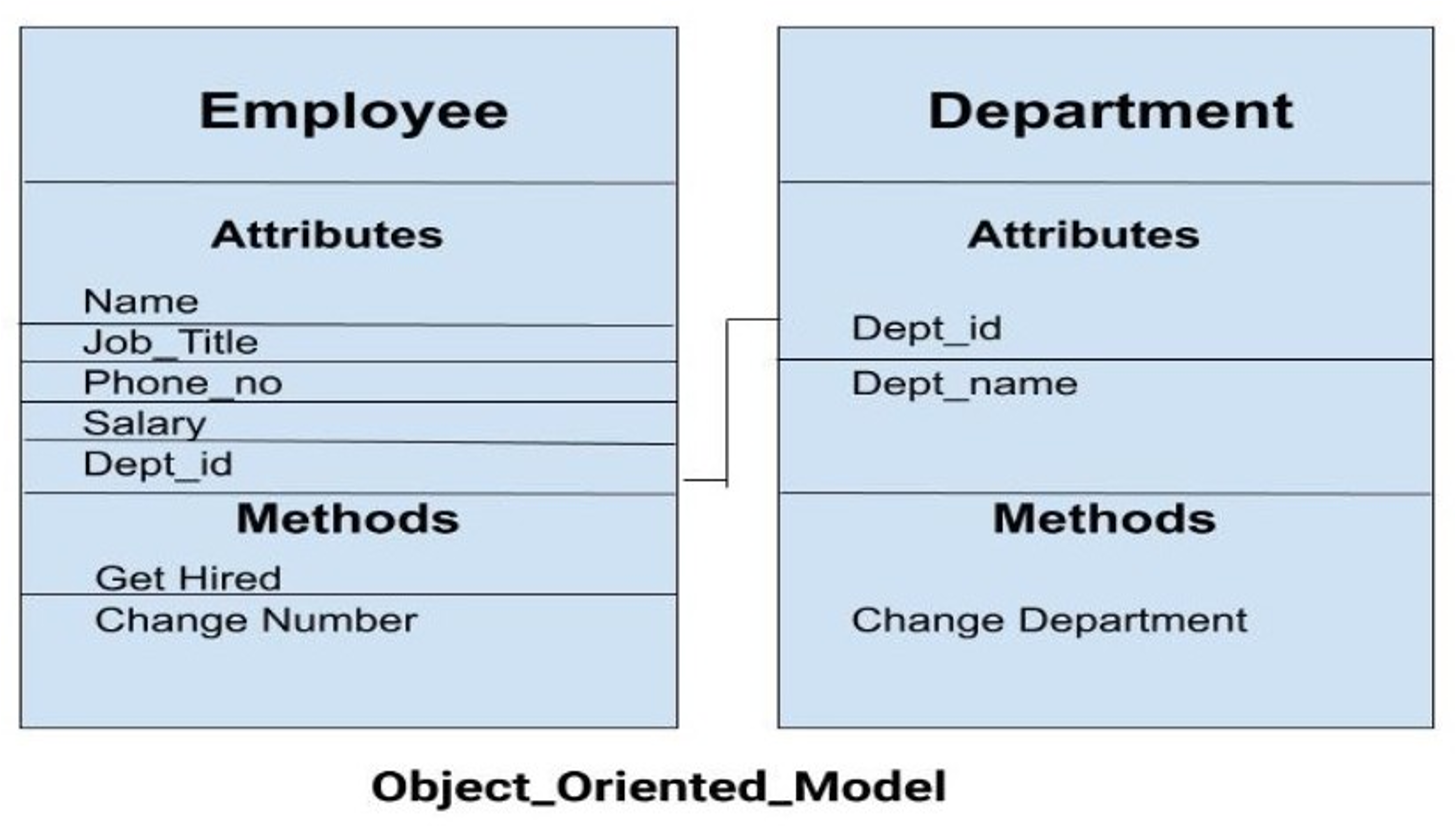
Structure:
- Objects contain both data and methods
- Classes define object structure
- Inheritance hierarchies
Core Concepts:
- Object: Instance of a class
- Class: Blueprint for objects
- Encapsulation: Data hiding
- Inheritance: Class hierarchies
- Polymorphism: Method overriding
- Object Identity (OID): Unique identifier
Characteristics:
- Complex data types supported
- Methods stored with data
- Supports multimedia and complex objects
- Natural mapping from OOP languages
Advantages:
- Natural for object-oriented programming
- Handles complex data (multimedia, CAD)
- Avoids impedance mismatch
- Encapsulation provides security
Limitations:
- Less mature than relational
- No standard query language
- Smaller ecosystem
- Limited ACID support
Examples: db4o, ObjectDB, Versant
COMPARATIVE ANALYSIS:
| Feature | Hierarchical | Network | Relational | Object-Oriented |
|---|---|---|---|---|
| Structure | Tree | Graph | Tables | Objects |
| Relationships | 1:N | M:N | Any | Any |
| Navigation | Procedural | Procedural | Declarative | Procedural |
| Flexibility | Low | Medium | High | High |
| Query Language | Proprietary | Proprietary | SQL (Standard) | Proprietary |
| Data Independence | Low | Low | High | Medium |
| Performance | Fast | Fast | Moderate | Fast |
| Complexity | Low | High | Medium | High |
Examples
EXAMPLE 1: HIERARCHICAL DATABASE
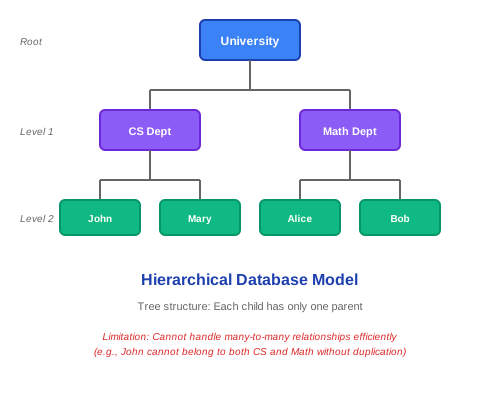
Limitation: If John double-majors in CS and Math, must duplicate record or use complex workarounds.
EXAMPLE 2: NETWORK DATABASE
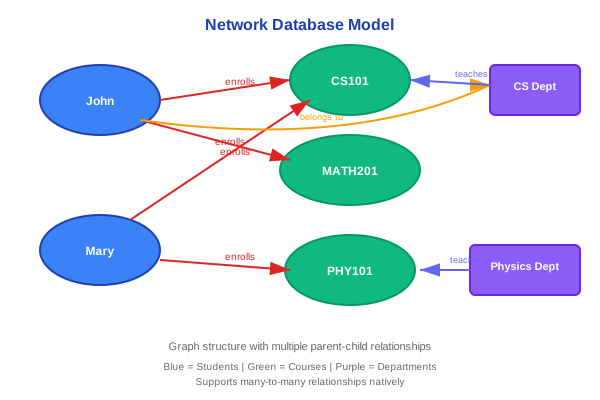
Network allows M:N relationships directly but requires pointer navigation.
EXAMPLE 3: RELATIONAL DATABASE
University Schema (Tables):
STUDENTS Table:
StudentID | Name        | Major    | Email
----------|-------------|----------|------------------
101       | John Doe    | CS       | john@uni.edu
102       | Jane Smith  | Math     | jane@uni.edu
103       | Bob Johnson | CS       | bob@uni.edu
COURSES Table:
CourseID | CourseName           | Credits | Department
---------|---------------------|---------|------------
CS101    | Intro to Programming | 3       | CS
CS202    | Database Systems     | 4       | CS
MATH101  | Calculus I          | 4       | Math
ENROLLMENT Table (Junction):
StudentID | CourseID | Semester | Grade
----------|----------|----------|------
101       | CS101    | Fall2024 | A
101       | CS202    | Fall2024 | B+
102       | MATH101  | Fall2024 | A
103       | CS101    | Fall2024 | B
SQL Query Examples:
-- Find all students enrolled in Database Systems
SELECT S.Name, S.Email
FROM STUDENTS S
JOIN ENROLLMENT E ON S.StudentID = E.StudentID
JOIN COURSES C ON E.CourseID = C.CourseID
WHERE C.CourseName = 'Database Systems';

-- Count enrollments per course
SELECT C.CourseName, COUNT(E.StudentID) as Enrollment_Count
FROM COURSES C
LEFT JOIN ENROLLMENT E ON C.CourseID = E.CourseID
GROUP BY C.CourseName;
EXAMPLE 4: OBJECT-ORIENTED DATABASE (db4o - Java)
// Define classes
class Student {
    int studentID;
    String name;
    String email;
    List<Course> courses;

    void enroll(Course c) {
        courses.add(c);
    }
}

class Course {
    String courseID;
    String courseName;
    int credits;
    List<Student> students;
}

// Store objects directly
Student john = new Student(101, "John Doe", "john@uni.edu");
Course cs101 = new Course("CS101", "Intro to Programming", 3);
john.enroll(cs101);

db.store(john); // Stores entire object graph

// Query objects
List<Student> csStudents = db.query(new Predicate<Student>() {
    public boolean match(Student s) {
        for (Course c : s.courses) {
            if (c.courseID.equals("CS101")) return true;
        }
        return false;
    }
});
EXAMPLE 5: REAL-WORLD APPLICATIONS
Hierarchical:
- File systems (directory structure)
- Organization charts
- XML documents
Network:
- Telecommunications networks
- Transportation systems
- Legacy mainframe applications
Relational:
- Banking systems
- E-commerce platforms
- Enterprise applications
- Web applications
Object-Oriented:
- CAD/CAM systems
- Multimedia databases
- Scientific applications
- Real-time systems
Real-World Use
PRACTICAL CONSIDERATIONS:
- Choosing the Right Model:
Use Relational When:
- ACID transactions required
- Complex queries needed
- Data highly structured
- Standard SQL queries
- Example: Banking, E-commerce
Use Object-Oriented When:
- Complex nested objects
- Tight OOP integration
- Multimedia content
- Example: CAD, Gaming, Simulations
Use Hierarchical/Network When:
- Legacy system maintenance
- Specific performance requirements
- Predefined access patterns
- Migration Strategies:
-- Hierarchical to Relational
-- From tree:
Company -> Department -> Employee

-- To tables:
CREATE TABLE Company (
    CompanyID INT PRIMARY KEY,
    Name VARCHAR(100)
);

CREATE TABLE Department (
    DeptID INT PRIMARY KEY,
    DeptName VARCHAR(100),
    CompanyID INT,
    FOREIGN KEY (CompanyID) REFERENCES Company(CompanyID)
);

CREATE TABLE Employee (
    EmpID INT PRIMARY KEY,
    Name VARCHAR(100),
    DeptID INT,
    FOREIGN KEY (DeptID) REFERENCES Department(DeptID)
);
- Hybrid Approaches (Object-Relational):
-- PostgreSQL: User-defined types
CREATE TYPE Address AS (
    street VARCHAR(100),
    city VARCHAR(50),
    zip VARCHAR(10)
);

CREATE TABLE Employee (
    EmpID INT PRIMARY KEY,
    Name VARCHAR(100),
    HomeAddress Address,  -- Complex type
    WorkAddress Address
);

-- Insert
INSERT INTO Employee VALUES (
    1,
    'John Doe',
    ROW('123 Main St', 'NYC', '10001'),
    ROW('456 Corp Ave', 'NYC', '10002')
);

-- Query
SELECT Name, (HomeAddress).city FROM Employee;
- Modern Trends:
-
Polyglot Persistence: Use multiple database types
- Relational for transactions
- Document for flexible data
- Graph for relationships
- Key-value for caching
-
NoSQL Movement: Beyond relational
- Document (MongoDB)
- Key-Value (Redis)
- Column-family (Cassandra)
- Graph (Neo4j)
- Performance Comparison:
| Operation | Hierarchical | Network | Relational | Object-Oriented |
|---|---|---|---|---|
| Simple read | Very Fast | Very Fast | Fast | Very Fast |
| Complex query | Slow | Fast | Very Fast | Medium |
| Insert | Fast | Medium | Fast | Very Fast |
| Update | Medium | Medium | Fast | Fast |
| Delete | Slow | Medium | Fast | Fast |
For exams
IMPORTANT EXAM QUESTIONS:
-
Compare and contrast Hierarchical, Network, and Relational database models.
Create table showing: Structure, relationships, advantages, disadvantages, examples -
Why did the Relational Model become dominant over Hierarchical and Network models?
Focus on: Simplicity, data independence, SQL standardization, flexibility -
Explain the structure and limitations of the Hierarchical database model with diagram.
Include: Tree structure, 1:N relationships, navigation, IMS example -
Describe the Network database model. How does it overcome limitations of Hierarchical model?
Graph structure, M:N support, set construct, pointer-based navigation -
What is the Relational Model? Explain its core concepts and advantages.
Tables, primary/foreign keys, SQL, data independence, normalization -
Explain the Object-Oriented database model. When is it preferred over Relational?
Objects, classes, encapsulation, complex data, OOP integration -
Draw an example showing how M:N relationships are handled in Hierarchical, Network, and Relational models.
-
What is the impedance mismatch problem? How does OODBMS solve it?
OOP vs Relational gap, OODBMS stores objects directly -
Explain the concept of data independence in the Relational model.
Logical and physical independence, schema layers -
Compare relational and object-oriented database models in terms of:
- Data structure
- Query language
- Data independence
- Performance
- Use cases
QUICK REVISION:
• Hierarchical = Tree structure (1:N only)
• Network = Graph structure (M:N supported)
• Relational = Tables (Most flexible, SQL)
• Object-Oriented = Objects with methods
• Relational Model dominates: Simplicity + SQL + Flexibility
• OO Model: Better for complex objects, OOP integration
• SQL: Declarative, standard query language
• Data Independence: Physical and Logical separation
Key points
KEY TAKEAWAYS:
✓ Database models evolved: Hierarchical → Network → Relational → Object-Oriented
✓ Hierarchical model: Tree structure, 1:N only, fast but inflexible
✓ Network model: Graph structure, supports M:N, complex navigation
✓ Relational model: Tables with rows/columns, dominant today, SQL standard
✓ Object-Oriented model: Objects with methods, natural OOP mapping
✓ Relational advantages: Simplicity, data independence, SQL standardization, flexibility
✓ OO advantages: Complex data types, no impedance mismatch, encapsulation
✓ Relational model uses: Banking, e-commerce, enterprise apps, web applications
✓ OO model uses: CAD/CAM, multimedia, scientific simulations
✓ Modern approach: Polyglot persistence (use right model for each use case)
✓ Object-Relational hybrid: PostgreSQL, Oracle support UDTs and complex types
✓ NoSQL emerged as alternative: Document, Key-Value, Column-family, Graph databases
REMEMBER: Understanding the evolution helps appreciate why certain design decisions were made and guides choosing the right model for new applications. The Relational Model's success stems from its elegant balance of simplicity, power, and standardization!