Introduction to Database
Database systems form the backbone of modern information management, handling everything from banking transactions to social media interactions. A Database Management System (DBMS) is a collection of interrelated data and a set of programs to access that data, providing a convenient and efficient way to store and retrieve database information. The primary goal is to manage data in a way that minimizes redundancy and ensures data integrity while allowing multiple users concurrent access.
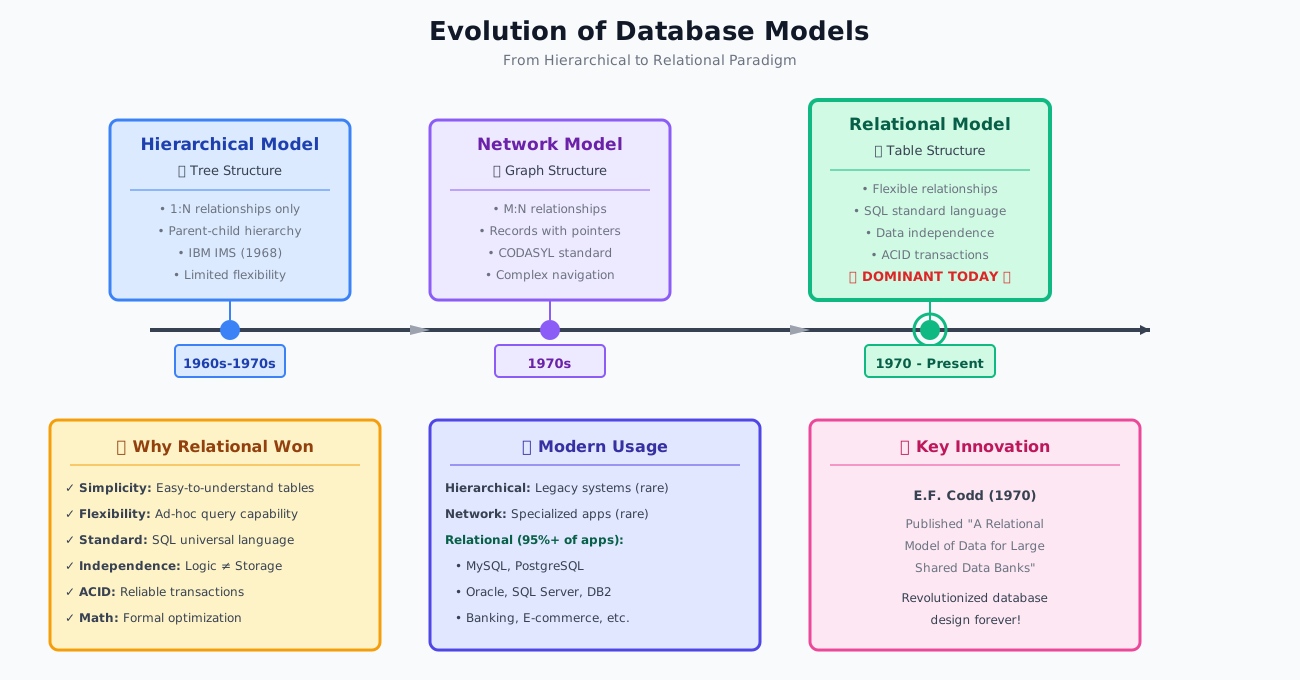
Evolution of Database Models
See how database technology evolved over time
Database Models Evolution
The Basics
A database is a collection of related data organized to serve multiple applications efficiently. Data represents recordable facts with implicit meaning, such as names, addresses, and balances. A DBMS serves as an interface between the database and end users or application programs.
Data vs Information (Quick Comparison)
| Data | Information |
|---|---|
| Raw facts and figures | Processed, organized, and meaningful output |
| May be unorganized (numbers, symbols, text) | Interpretable and useful for decision-making |
| Input to a system | Output of processing |
| Example: 95, 88, 76 | Example: Average = 86.33, Grade = A |
| By itself may not add value | Adds value and context |
Key Characteristics of the Database Approach
-
Self-describing nature: Database contains not only data but also metadata (data about data) in the system catalog
-
Insulation between programs and data: Program-data independence allows changing data structure without modifying programs
-
Support for multiple views: Different users can have different perspectives of the same data
-
Sharing of data and multiuser transaction processing: Multiple users can access database simultaneously while maintaining consistency
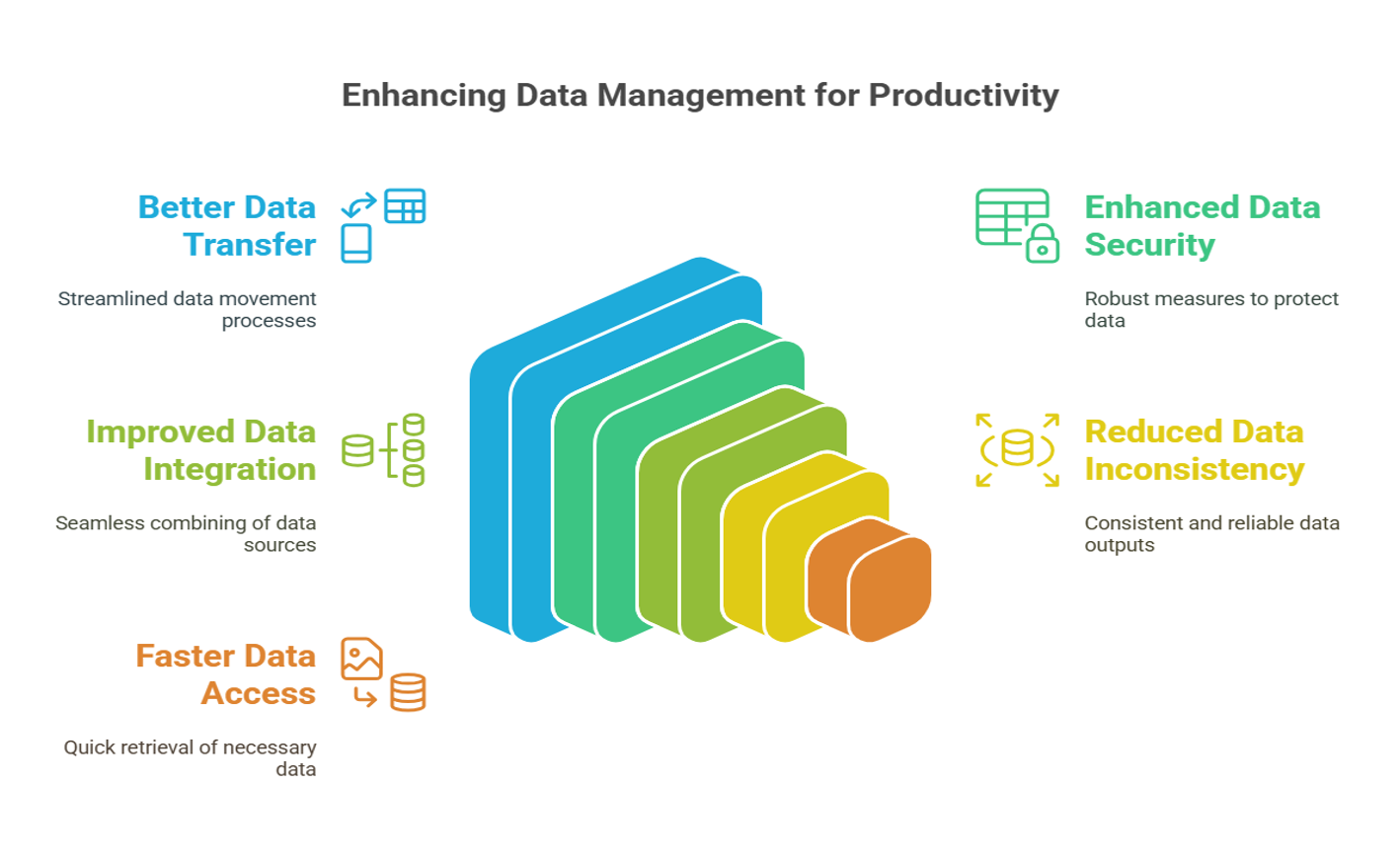
Advantages of Using a DBMS
- Controlling redundancy: Eliminates duplicate data storage
- Restricting unauthorized access: Security and authorization mechanisms
- Providing persistent storage: Data outlives programs that create it
- Providing backup and recovery: Protection against hardware/software failures
- Enforcing integrity constraints: Rules to maintain data accuracy
- Permitting inference and actions using rules: Database triggers and stored procedures
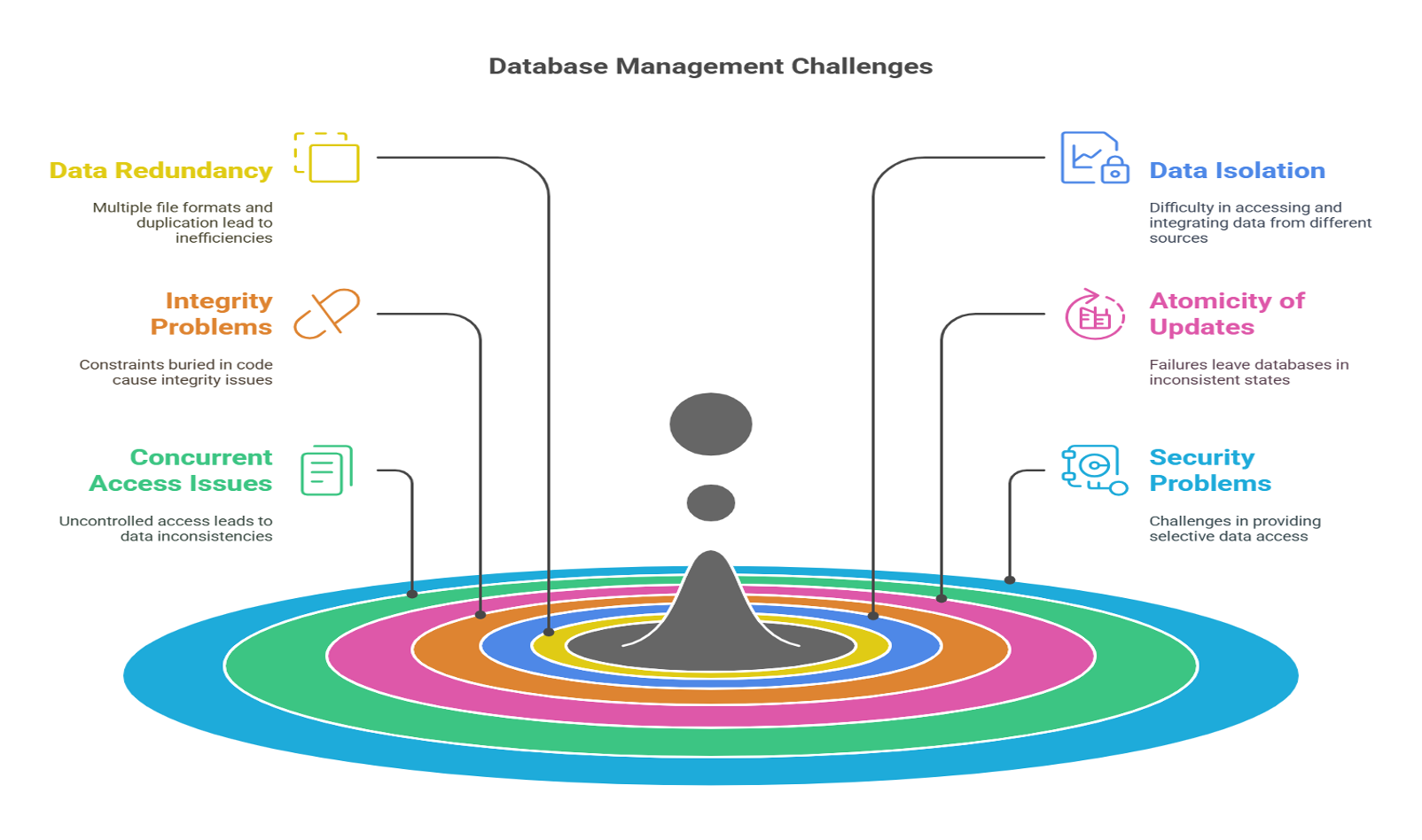
Disadvantages of File-Based Systems
The file-based approach suffers from data redundancy, inconsistency, difficulty in accessing data, data isolation, integrity problems, atomicity issues, concurrent access anomalies, and security problems — all of which are addressed by a DBMS.
Technical Details
DATABASE MODELS EVOLUTION:
- HIERARCHICAL MODEL (1960s-1970s):
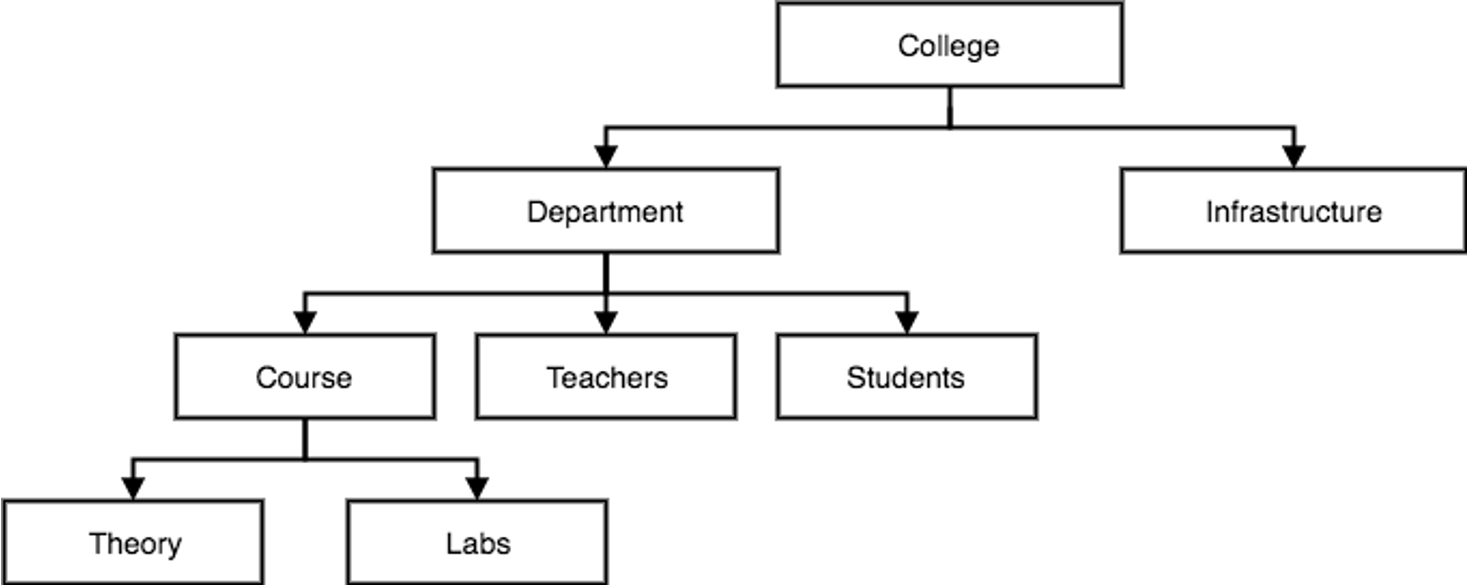
Structure: Tree-like hierarchy with parent-child relationships
Characteristics:
• One-to-many (1:N) relationships only
• Single root for each tree
• Each child has exactly one parent
• Navigation through explicit paths
Example: IMS (Information Management System) by IBM
Limitations:
• Difficulty handling many-to-many relationships
• Data redundancy when representing complex relationships
• Limited query flexibility
• Reorganization is difficult
- NETWORK MODEL (1970s):
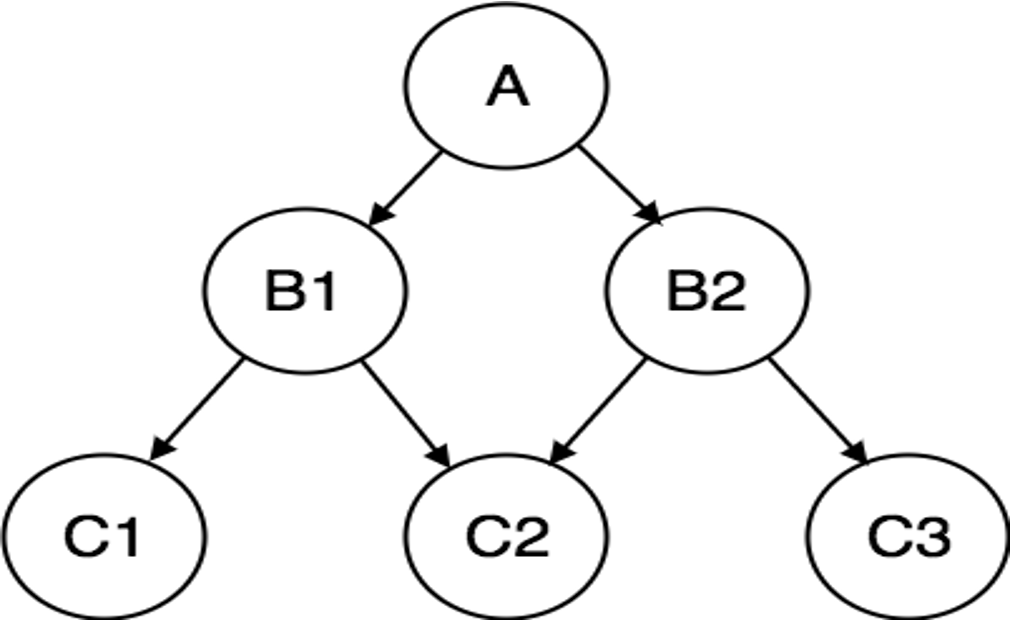
Structure: Graph-based with records (nodes) and sets (edges)
Characteristics:
• Many-to-many (M:N) relationships supported
• Records connected through pointers
• Set construct for 1:N relationships
• CODASYL (Conference on Data Systems Languages) standard
Example: IDMS (Integrated Database Management System)
Advantages over Hierarchical:
• More flexible relationship representation
• Better for complex queries
Limitations:
• Complex navigation logic
• Difficult to modify structure
• Application programs tightly coupled with database structure
- RELATIONAL MODEL (1970-present):
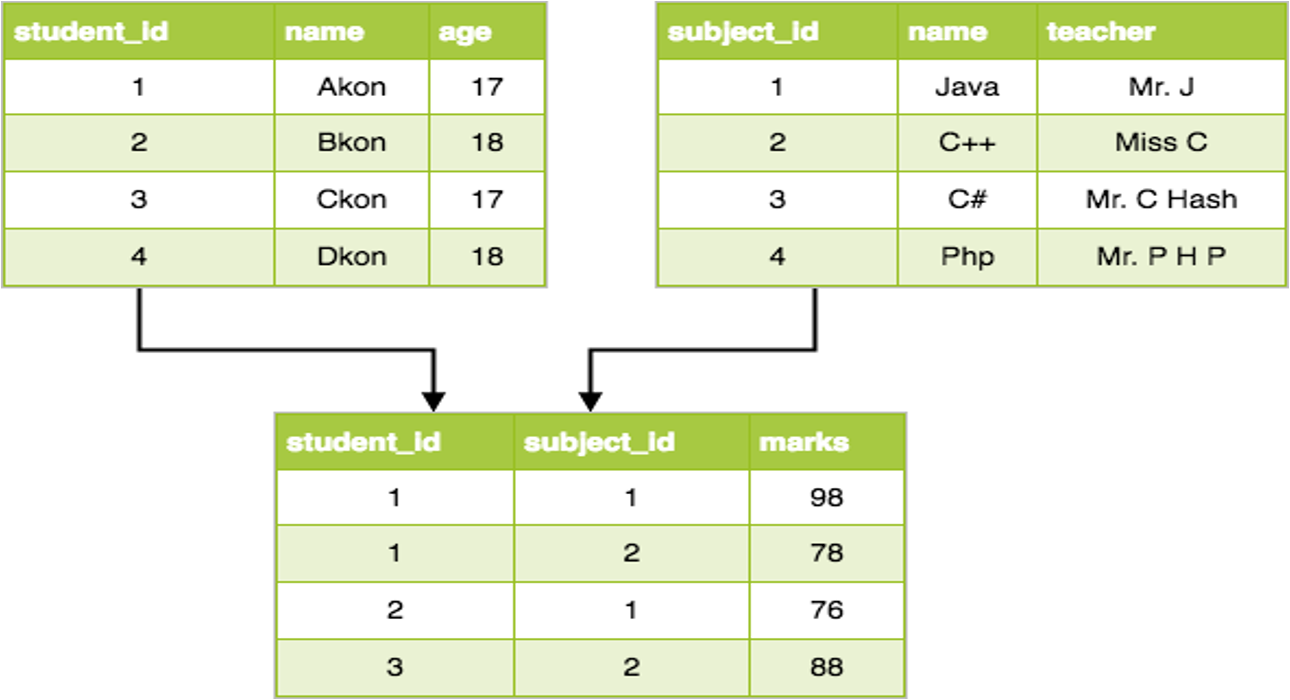
Foundation: E.F. Codd's relational model (1970)
Structure: Data organized in tables (relations)
Core Concepts:
• Relation: Table with rows (tuples) and columns (attributes)
• Domain: Set of allowed values for an attribute
• Primary Key: Unique identifier for tuples
• Foreign Key: Reference to primary key in another relation
Characteristics:
• Simple tabular structure
• Data independence (logical and physical)
• Declarative query language (SQL)
• Mathematical foundation (relational algebra/calculus)
• ACID properties (Atomicity, Consistency, Isolation, Durability)
Advantages:
• Structural independence: Changes in structure don't affect applications
• Ad hoc query capability: Flexible data retrieval
• Data integrity through constraints
• Normalization to reduce redundancy
Examples: MySQL, PostgreSQL, Oracle, SQL Server, DB2
COMPARATIVE ANALYSIS:
| Feature | Hierarchical | Network | Relational |
|---|---|---|---|
| Structure | Tree | Graph | Tables |
| Relationships | 1:N | M:N | Any |
| Navigation | Procedural | Procedural | Declarative |
| Flexibility | Low | Medium | High |
| Query Language | Proprietary | Proprietary | SQL (Standard) |
| Data Independence | Low | Low | High |
| Performance | Fast | Fast | Moderate |
Why Relational Model Dominates:
- Simplicity: Easy to understand and use
- Flexibility: Ad hoc queries without predefined access paths
- Data Independence: Separation of logical and physical views
- Standard Language: SQL is universally adopted
- Mathematical Foundation: Formal query optimization
- ACID Guarantees: Reliable transaction processing
Examples
EXAMPLE 1: HIERARCHICAL DATABASE
University Structure (Tree):
University
|
-------------------------
| |
Department Department
(Computer Science) (Mathematics)
| |
---------- ----------
| | | |
Faculty Students Faculty Students
Limitation: A student double-majoring requires duplication or complex workarounds.
EXAMPLE 2: NETWORK DATABASE
Student-Course Registration (Graph):
Students <-------- Enrollment --------> Courses
| | |
| (Properties: Grade, |
| Semester) |
| |
Departments Instructors
Network allows M:N relationships directly but requires complex pointer navigation.
EXAMPLE 3: RELATIONAL DATABASE
University Schema (Tables):
STUDENTS Table:
| StudentID | Name | Major | |
|---|---|---|---|
| 101 | John Doe | CS | john@uni.edu |
| 102 | Jane Smith | Math | jane@uni.edu |
| 103 | Bob Johnson | CS | bob@uni.edu |
COURSES Table:
| CourseID | CourseName | Credits | Department |
|---|---|---|---|
| CS101 | Intro to Programming | 3 | CS |
| CS202 | Database Systems | 4 | CS |
| MATH101 | Calculus I | 4 | Math |
ENROLLMENT Table (Junction):
| StudentID | CourseID | Semester | Grade |
|---|---|---|---|
| 101 | CS101 | Fall2024 | A |
| 101 | CS202 | Fall2024 | B+ |
| 102 | MATH101 | Fall2024 | A |
| 103 | CS101 | Fall2024 | B |
SQL Query Examples:
-- Find all students enrolled in Database Systems
SELECT S.Name, S.Email
FROM STUDENTS S
JOIN ENROLLMENT E ON S.StudentID = E.StudentID
JOIN COURSES C ON E.CourseID = C.CourseID
WHERE C.CourseName = 'Database Systems';
-- Count enrollments per course
SELECT C.CourseName, COUNT(E.StudentID) as Enrollment_Count
FROM COURSES C
LEFT JOIN ENROLLMENT E ON C.CourseID = E.CourseID
GROUP BY C.CourseName;
REAL-WORLD APPLICATIONS:
-
Banking Systems: Account management, transactions, customer data
• Relational model ensures ACID properties for financial transactions
• Complex queries for fraud detection and reporting -
Airline Reservation Systems: Flight schedules, bookings, passenger info
• High concurrency handling thousands of simultaneous bookings
• Complex relationships between flights, passengers, seats -
E-Commerce Platforms: Products, orders, customers, inventory
• Flexible schema for diverse product catalogs
• Transaction support for payment processing -
Healthcare Systems: Patient records, appointments, prescriptions
• Data integrity critical for patient safety
• HIPAA compliance through access control
Real-World Use
PRACTICAL USAGE AND IMPLEMENTATION:
-
Choosing the Right Model:
• Use Relational for: General-purpose applications, ACID requirements, complex queries
• Consider NoSQL (modern evolution) for: Massive scale, flexible schema, specific access patterns -
Database Design Process:
Step 1: Requirements Analysis - Understand what data to store and how it will be used
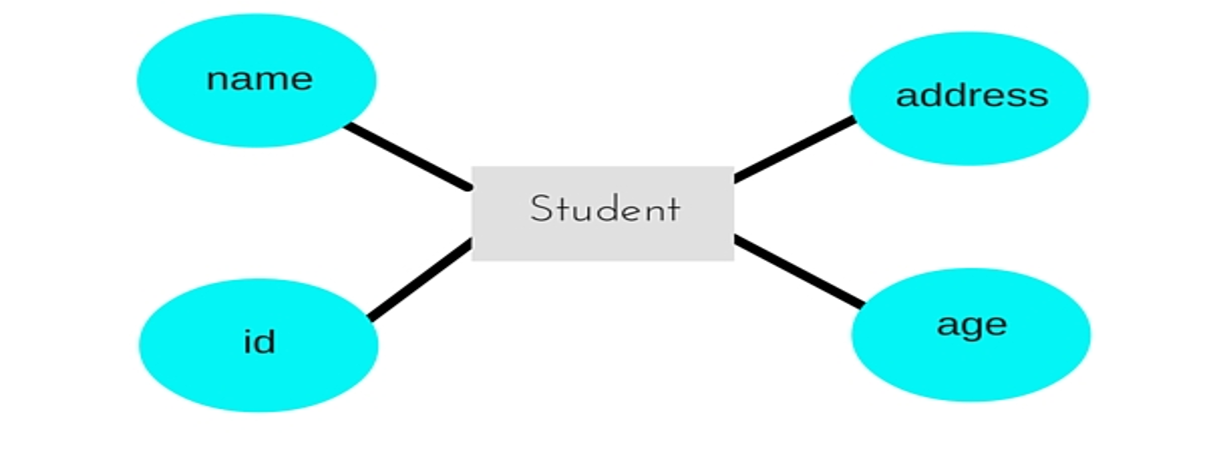
Step 2: Conceptual Design - Create ER diagram showing entities and relationships
Step 3: Logical Design - Convert ER to relational schema with normalization
Step 4: Physical Design - Optimize with indexes, partitioning, clustering -
Real Implementation Example (MySQL):
-- Create database
CREATE DATABASE UniversityDB;
USE UniversityDB;
-- Create tables with constraints
CREATE TABLE Students (
StudentID INT PRIMARY KEY AUTO_INCREMENT,
Name VARCHAR(100) NOT NULL,
Email VARCHAR(100) UNIQUE,
Major VARCHAR(50),
EnrollmentDate DATE DEFAULT CURRENT_DATE
);
CREATE TABLE Courses (
CourseID VARCHAR(10) PRIMARY KEY,
CourseName VARCHAR(100) NOT NULL,
Credits INT CHECK (Credits > 0),
Department VARCHAR(50)
);
CREATE TABLE Enrollment (
StudentID INT,
CourseID VARCHAR(10),
Semester VARCHAR(20),
Grade CHAR(2),
PRIMARY KEY (StudentID, CourseID, Semester),
FOREIGN KEY (StudentID) REFERENCES Students(StudentID)
ON DELETE CASCADE,
FOREIGN KEY (CourseID) REFERENCES Courses(CourseID)
ON UPDATE CASCADE
);
-
Industry Best Practices:
• Always use foreign keys to maintain referential integrity
• Create indexes on frequently queried columns
• Regular backups and disaster recovery plans
• Monitor performance and optimize queries
• Implement proper access control and authentication -
Career Relevance:
• Database Administrator (DBA): Manages database systems, ensures performance and security
• Data Engineer: Designs and builds data pipelines
• Backend Developer: Implements database interactions in applications
• Data Analyst: Writes complex SQL queries for business insights
For exams
IMPORTANT EXAM QUESTIONS:
-
Define Database and DBMS. What are the main characteristics of the database approach?
Answer: Cover self-describing nature, program-data independence, multiple views, sharing -
List and explain the advantages of using a DBMS over file systems.
Key points: Redundancy control, restricted access, persistent storage, backup/recovery, integrity constraints -
Compare and contrast Hierarchical, Network, and Relational database models.
Create table showing: Structure, relationships supported, advantages, disadvantages, examples -
Why did the Relational Model become dominant over Hierarchical and Network models?
Focus on: Simplicity, data independence, SQL standardization, flexibility -
Explain the concept of data independence with examples.
Distinguish between logical and physical data independence -
What are the disadvantages of file-based systems that led to database systems?
Points: Data redundancy, inconsistency, difficulty in access, integrity problems, atomicity issues, security problems -
Describe the structure and limitations of the Hierarchical database model.
Include: Tree structure, 1:N relationships, navigation, IMS example -
Draw a simple example showing how M:N relationships are handled differently in Hierarchical, Network, and Relational models.
-
What is a view in a database? Why are multiple views important?
Explain: Security, customization, simplicity for different user groups -
Explain the term 'self-describing' nature of a database system.
Focus on: System catalog, metadata, data dictionary
QUICK REVISION POINTS:
• Database = Collection of related data
• DBMS = Software to manage database
• Hierarchical = Tree (1:N only)
• Network = Graph (M:N supported)
• Relational = Tables (Most flexible)
• SQL = Standard query language for relational databases
• Data Independence = Change structure without affecting programs
Key points
KEY TAKEAWAYS:
✓ A database is a collection of related data; DBMS is the software that manages it
✓ Database approach provides: data independence, controlled redundancy, concurrent access, backup/recovery, security
✓ Three major historical models: Hierarchical (tree), Network (graph), Relational (tables)
✓ Hierarchical model: Simple but limited to 1:N relationships, used in IBM's IMS
✓ Network model: More flexible with M:N relationships but complex navigation
✓ Relational model: Dominant today due to simplicity, SQL standardization, and data independence
✓ Relational databases organize data in tables with rows (tuples) and columns (attributes)
✓ SQL provides declarative querying - specify WHAT you want, not HOW to get it
✓ Modern applications almost exclusively use relational or NoSQL (evolution of database concepts)
✓ Understanding database evolution helps appreciate why certain design decisions were made
✓ Database systems are critical infrastructure for: banking, healthcare, e-commerce, government, education
✓ Career opportunities: DBA, Data Engineer, Backend Developer, Data Analyst all require database knowledge
REMEMBER: The shift from Hierarchical → Network → Relational represents increasing flexibility and decreasing complexity for users, while the system handles complexity internally.
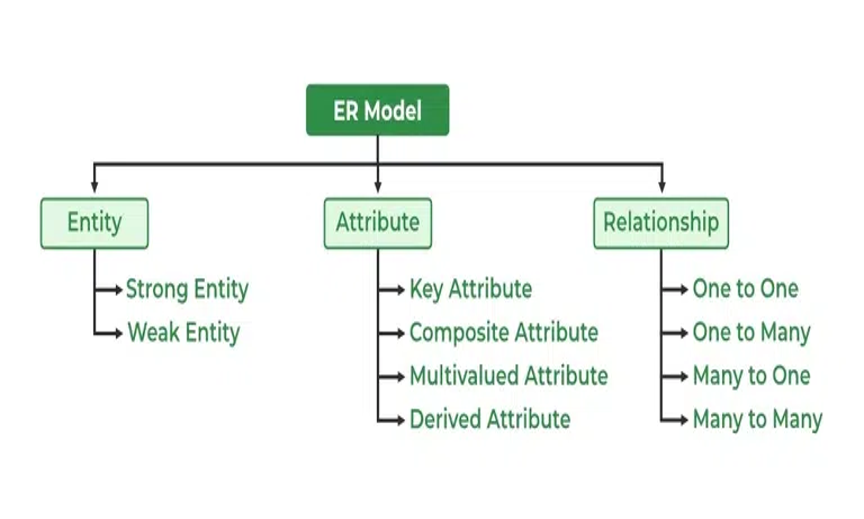
Quick Quiz
1. Which database model uses a tree-like structure?
2. What does DBMS stand for?
3. Which model is most widely used today?