Database System Architecture
Database architecture defines how a database is structured, stored, managed, and accessed. The architecture provides different views to different users and handles the complexity of physical storage while presenting a simple logical view. Understanding this layered architecture is fundamental to designing scalable, maintainable database systems that can evolve with changing requirements without disrupting applications.
🏗️ Interactive: Three-Schema Architecture
Click on each layer to explore its details
🏛️ Three-Schema Architecture Diagram
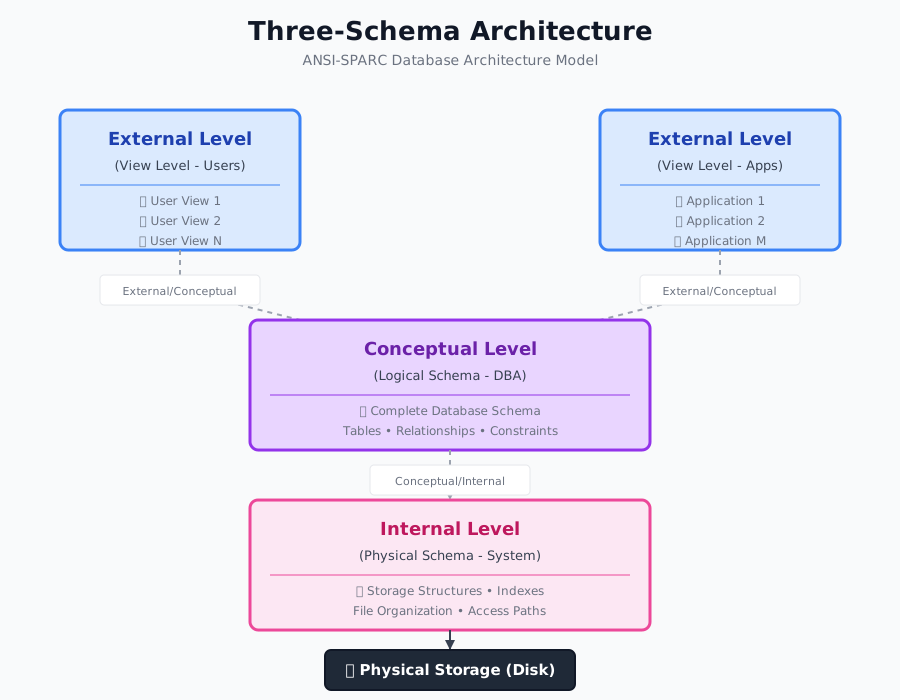
Three-Schema Architecture Diagram
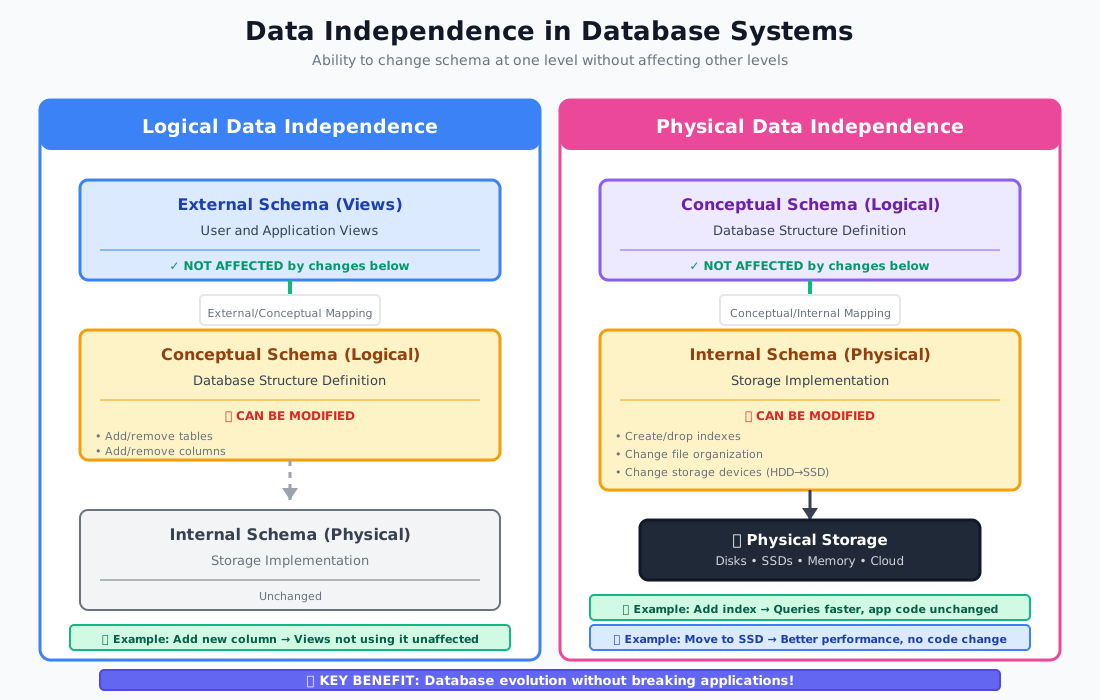
Data Independence Explained
The Basics
A database system is divided into modules that deal with different responsibilities. The overall system structure consists of various components that interact to provide the database services.
Three-Schema Architecture (ANSI-SPARC)
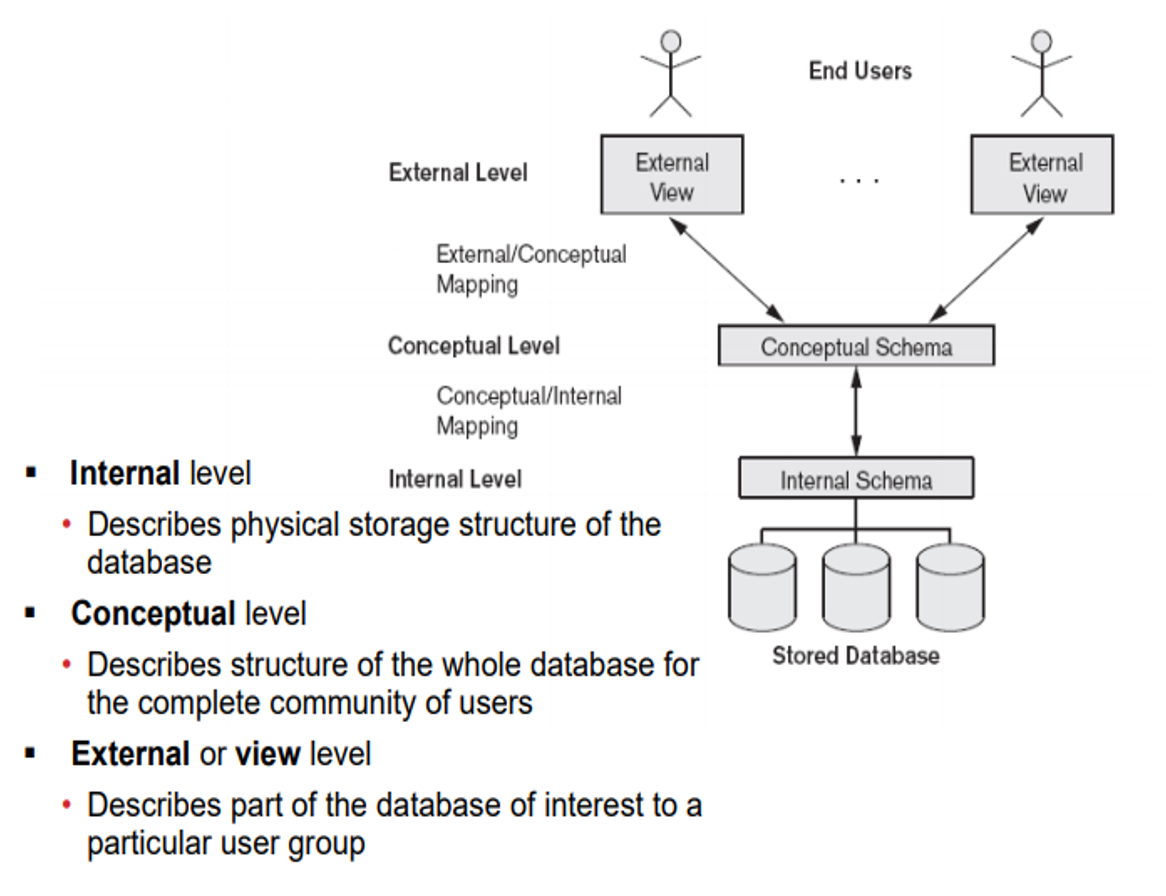
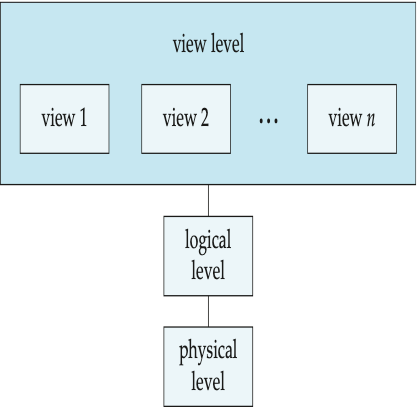
The three-schema architecture separates user applications from the physical database through three levels of abstraction:
- EXTERNAL LEVEL (View Level):
• Highest level of abstraction
• Describes WHAT data is seen by individual users
• Multiple external schemas (views) exist
• Each view describes the portion of database relevant to a particular user group
• Hides irrelevant details and restricts access
• Different users can have completely different views
Example: HR Manager sees employee salaries, regular employee doesn't.
- CONCEPTUAL LEVEL (Logical Level):
• Community view of the database
• Describes WHAT data is stored and relationships among data
• Single conceptual schema for entire database
• Hides details of physical storage
• Focus on entities, data types, relationships, constraints
• Used by Database Administrators (DBAs)
Example: Complete schema with all tables, relationships, constraints
- INTERNAL LEVEL (Physical Level):
• Lowest level of abstraction
• Describes HOW data is physically stored
• Deals with: Storage structures, indexes, access paths, file organization
• Concerned with: Storage space allocation, data compression, encryption
• Used by system programmers and DBAs
Example: B-tree indexes, heap files, hash buckets, block sizes
MAPPINGS BETWEEN LEVELS:
• External/Conceptual Mapping: Transforms external view requests to conceptual schema
• Conceptual/Internal Mapping: Maps conceptual schema to physical storage
Data Independence
The capacity to change schema at one level without affecting schema at the next higher level.
- LOGICAL DATA INDEPENDENCE:
• Ability to change conceptual schema without changing external schemas or application programs
• Changes might include: Adding/removing attributes, creating/removing tables, changing constraints
• External/Conceptual mapping handles the conversion
• More difficult to achieve than physical independence
Example: Adding a new table or column doesn't affect existing views.
- PHYSICAL DATA INDEPENDENCE:
• Ability to change internal schema without changing conceptual schema
• Changes might include: Using different file organization, creating/dropping indexes, changing storage devices, modifying data compression
• Conceptual/Internal mapping handles the conversion
• Easier to achieve than logical independence
Example: Creating an index on a column doesn't affect queries.
BENEFITS OF DATA INDEPENDENCE:
• Application programs don't need to be rewritten when database structure changes
• Physical storage can be optimized without affecting applications
• Different users can view data differently
• Security: Users only see authorized data
• Maintenance and evolution of database is easier
Technical Details
DATABASE LANGUAGES:
Database systems provide specialized languages for different operations:
- DATA DEFINITION LANGUAGE (DDL):
Used to define and modify database structure (schema).
Key DDL Commands:
• CREATE: Define new database objects (tables, indexes, views)
• ALTER: Modify existing database objects
• DROP: Delete database objects
• TRUNCATE: Remove all records from a table
• RENAME: Rename database objects
DDL Compiler:
• Processes DDL statements
• Generates metadata stored in data dictionary (system catalog)
• Data dictionary contains: Table definitions, attribute definitions, constraints, indexes, storage information
DDL Features:
• Specify storage structure and access methods
• Define integrity constraints (primary keys, foreign keys, check constraints)
• Define security and authorization information
• Specify physical storage parameters
- DATA MANIPULATION LANGUAGE (DML):
Used to access and manipulate data in the database.
Types of DML:
A. PROCEDURAL DML:
• User specifies WHAT data is needed AND HOW to get it
• Requires step-by-step navigation
• Examples: Hierarchical and Network model languages
B. NON-PROCEDURAL (DECLARATIVE) DML:
• User specifies WHAT data is needed without specifying HOW
• System determines efficient way to access data
• Easier to learn and use
• Example: SQL (Structured Query Language)
Key DML Commands (SQL):
• SELECT: Retrieve data from database
• INSERT: Add new records
• UPDATE: Modify existing records
• DELETE: Remove records
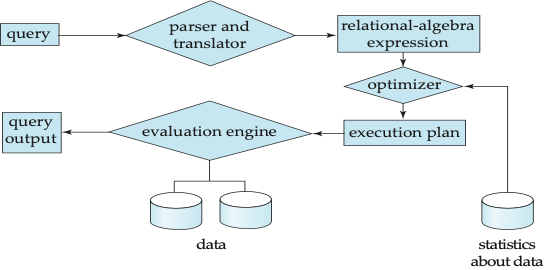
DML Processing:
• DML Compiler: Translates DML statements
• Query Optimizer: Determines efficient execution strategy
• Query Evaluation Engine: Executes the optimized query plan
- DATA CONTROL LANGUAGE (DCL):
Used to control access to data in the database.
Key DCL Commands:
• GRANT: Give user access privileges
• REVOKE: Remove user access privileges
DCL Controls:
• User authentication
• Authorization levels
• Role-based access control
• Object-level permissions
- TRANSACTION CONTROL LANGUAGE (TCL):
Manages transactions in the database.
Key TCL Commands:
• COMMIT: Save transaction changes permanently
• ROLLBACK: Undo transaction changes
• SAVEPOINT: Create points within transaction to rollback to
Database System Components
-
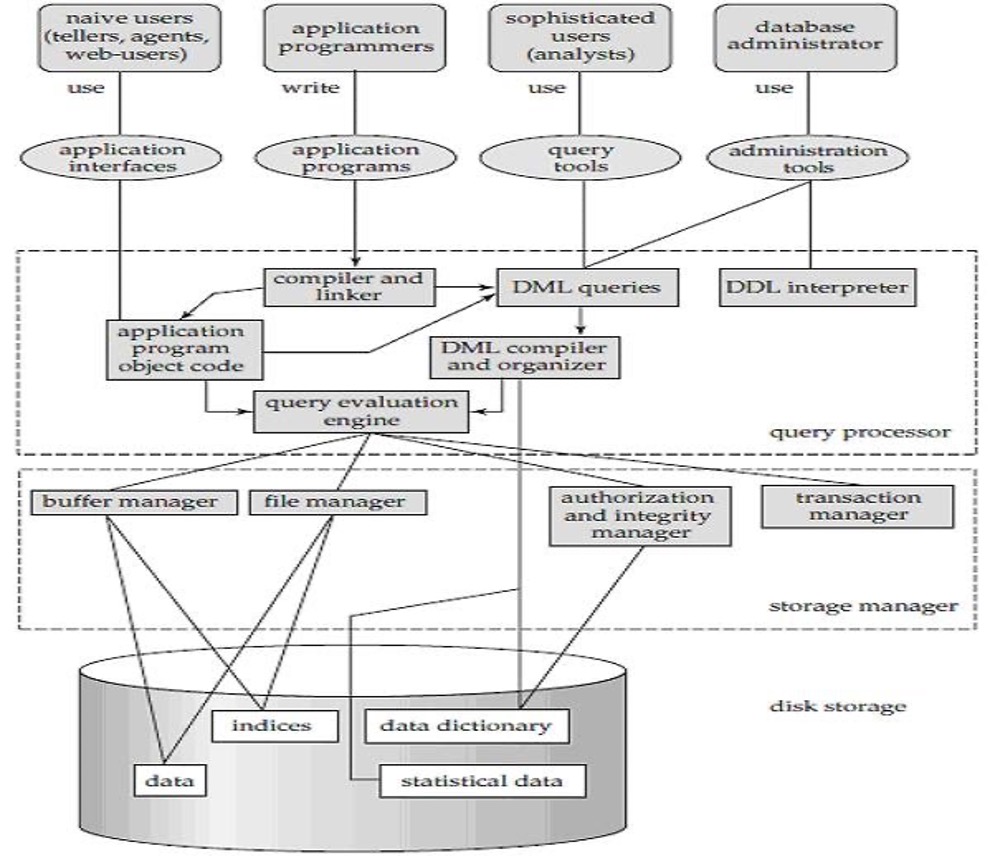
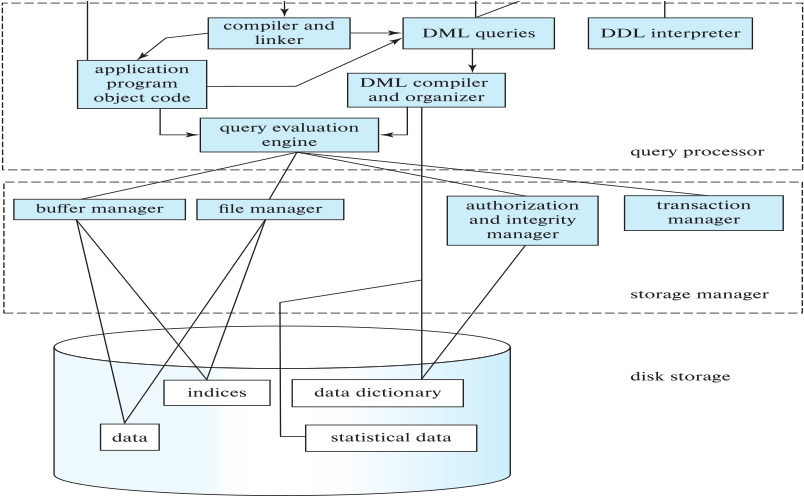
STORAGE MANAGER:
• Interface between low-level data and application programs
• Translates DML statements to low-level file-system commands
• Responsible for: Storing, retrieving, updating dataComponents:
• Authorization and Integrity Manager
• Transaction Manager
• File Manager
• Buffer Manager -
QUERY PROCESSOR:
• Simplifies and facilitates data accessComponents:
• DDL Interpreter: Interprets DDL statements
• DML Compiler: Translates DML to query evaluation plan
• Query Optimizer: Chooses lowest-cost evaluation plan
• Query Evaluation Engine: Executes query plan -
DATABASE USERS:
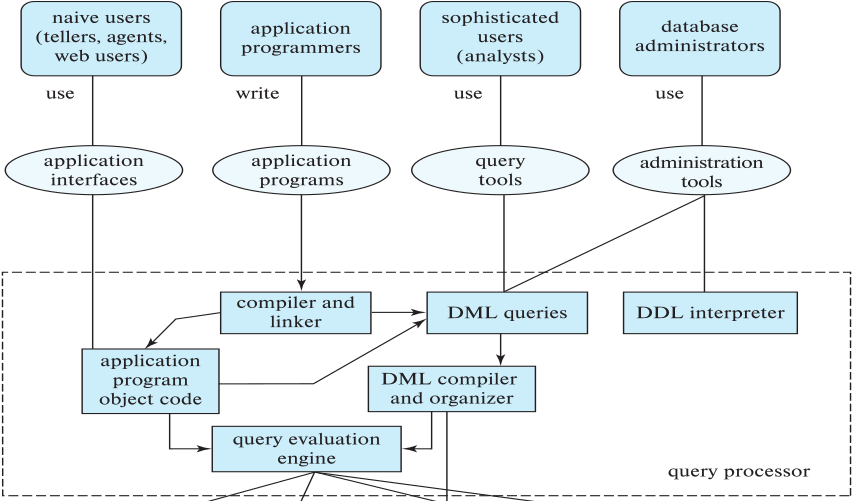
A. Naive Users: Invoke application programs (ATM users, airline booking)
B. Application Programmers: Write application programs using DML
C. Sophisticated Users: Use query tools, don't write programs (analysts)
D. Database Administrator (DBA): Central control over system
- DBA RESPONSIBILITIES:
• Schema definition
• Storage structure and access method definition
• Schema and physical organization modification
• Granting authorization for data access
• Routine maintenance: Backups, performance monitoring, security
CLIENT-SERVER ARCHITECTURE:
Two-Tier Architecture:
• Client: Application program, user interface
• Server: Database system (query processing, transaction management)
• Communication via database protocols (ODBC, JDBC)
Three-Tier Architecture:
• Client: Presentation layer (browser, mobile app)
• Application Server: Business logic layer (web server, API)
• Database Server: Data layer
• Benefits: Scalability, maintainability, security
Modern web applications typically use three-tier architecture.
Examples
EXAMPLE 1: DDL STATEMENTS (Creating Database Schema)
-- Create a database
CREATE DATABASE UniversityDB;
USE UniversityDB;
-- Create Department table
CREATE TABLE Department (
DeptID INT PRIMARY KEY AUTO_INCREMENT,
DeptName VARCHAR(100) NOT NULL UNIQUE,
Building VARCHAR(50),
Budget DECIMAL(12,2) CHECK (Budget > 0)
);
-- Create Student table with constraints
CREATE TABLE Student (
StudentID INT PRIMARY KEY,
FirstName VARCHAR(50) NOT NULL,
LastName VARCHAR(50) NOT NULL,
Email VARCHAR(100) UNIQUE,
DeptID INT,
EnrollmentDate DATE DEFAULT CURRENT_DATE,
GPA DECIMAL(3,2) CHECK (GPA >= 0.0 AND GPA <= 4.0),
FOREIGN KEY (DeptID) REFERENCES Department(DeptID)
ON DELETE SET NULL
ON UPDATE CASCADE
);
-- Create index for faster queries
CREATE INDEX idx_student_lastname ON Student(LastName);
-- Alter table to add new column
ALTER TABLE Student
ADD COLUMN PhoneNumber VARCHAR(15);
-- Modify column definition
ALTER TABLE Student
MODIFY COLUMN Email VARCHAR(150);
-- Drop index
DROP INDEX idx_student_lastname ON Student;
-- Rename table
RENAME TABLE Student TO Students;
EXAMPLE 2: DML STATEMENTS (Data Manipulation)
-- INSERT: Adding new records
INSERT INTO Department (DeptName, Building, Budget)
VALUES ('Computer Science', 'Tech Building', 500000.00);
INSERT INTO Department VALUES
(NULL, 'Mathematics', 'Science Hall', 300000.00),
(NULL, 'Physics', 'Science Hall', 450000.00);
INSERT INTO Students (StudentID, FirstName, LastName, Email, DeptID, GPA)
VALUES (101, 'John', 'Doe', 'john.doe@uni.edu', 1, 3.75);
-- SELECT: Retrieving data
-- Simple query
SELECT * FROM Students;
-- With WHERE clause
SELECT FirstName, LastName, GPA
FROM Students
WHERE GPA > 3.5;
-- With JOIN
SELECT S.FirstName, S.LastName, D.DeptName
FROM Students S
JOIN Department D ON S.DeptID = D.DeptID;
-- With aggregation
SELECT D.DeptName, COUNT(S.StudentID) as StudentCount, AVG(S.GPA) as AvgGPA
FROM Department D
LEFT JOIN Students S ON D.DeptID = S.DeptID
GROUP BY D.DeptName
HAVING COUNT(S.StudentID) > 0;
-- UPDATE: Modifying existing records
UPDATE Students
SET GPA = 3.85
WHERE StudentID = 101;
-- Update with calculation
UPDATE Department
SET Budget = Budget * 1.10
WHERE DeptName = 'Computer Science';
-- DELETE: Removing records
DELETE FROM Students
WHERE EnrollmentDate < '2020-01-01';
-- Delete all records (but keep table structure)
DELETE FROM Students;
-- Or use TRUNCATE (faster)
TRUNCATE TABLE Students;
EXAMPLE 3: DCL STATEMENTS (Access Control)
-- Create users
CREATE USER 'student_user'@'localhost' IDENTIFIED BY 'password123';
CREATE USER 'faculty_user'@'localhost' IDENTIFIED BY 'securepass456';
-- GRANT privileges
-- Give SELECT access to student
GRANT SELECT ON UniversityDB.Students TO 'student_user'@'localhost';
-- Give multiple privileges to faculty
GRANT SELECT, INSERT, UPDATE ON UniversityDB.* TO 'faculty_user'@'localhost';
-- Grant with ability to grant to others
GRANT ALL PRIVILEGES ON UniversityDB.* TO 'admin_user'@'localhost'
WITH GRANT OPTION;
-- Create role and assign privileges
CREATE ROLE 'data_analyst';
GRANT SELECT ON UniversityDB.* TO 'data_analyst';
GRANT 'data_analyst' TO 'analyst_user'@'localhost';
-- REVOKE privileges
REVOKE INSERT, UPDATE ON UniversityDB.Students FROM 'faculty_user'@'localhost';
-- Revoke all privileges
REVOKE ALL PRIVILEGES ON UniversityDB.* FROM 'student_user'@'localhost';
EXAMPLE 4: TCL STATEMENTS (Transaction Control)
-- Bank transfer example demonstrating transaction
START TRANSACTION;
-- Deduct from account A
UPDATE Accounts
SET Balance = Balance - 500
WHERE AccountID = 'A123';
-- Add to account B
UPDATE Accounts
SET Balance = Balance + 500
WHERE AccountID = 'B456';
-- Check if any account went negative
IF (SELECT MIN(Balance) FROM Accounts WHERE AccountID IN ('A123', 'B456')) < 0 THEN
ROLLBACK; -- Undo both updates
SELECT 'Transaction failed: Insufficient funds' AS Message;
ELSE
COMMIT; -- Make changes permanent
SELECT 'Transaction successful' AS Message;
END IF;
-- Using SAVEPOINT
START TRANSACTION;
INSERT INTO Students VALUES (201, 'Alice', 'Smith', 'alice@uni.edu', 1, 3.5);
SAVEPOINT sp1;
INSERT INTO Students VALUES (202, 'Bob', 'Johnson', 'bob@uni.edu', 2, 3.2);
SAVEPOINT sp2;
INSERT INTO Students VALUES (203, 'Charlie', 'Brown', 'charlie@uni.edu', 1, 3.9);
-- Error in last insert, rollback to sp2
ROLLBACK TO SAVEPOINT sp2;
-- Commit the first two inserts
COMMIT;
EXAMPLE 5: DATA INDEPENDENCE IN ACTION
SCENARIO: Physical Data Independence
-- Original: No index, slow query
SELECT * FROM Students WHERE LastName = 'Smith';
-- Query scans entire table (slow for large tables)
-- DBA creates index (internal level change)
CREATE INDEX idx_lastname ON Students(LastName);
-- Same query, now fast (uses index)
SELECT * FROM Students WHERE LastName = 'Smith';
-- Application code unchanged, but performance improved!
SCENARIO: Logical Data Independence
-- Original view used by application
CREATE VIEW StudentInfo AS
SELECT StudentID, FirstName, LastName, Email
FROM Students;
-- DBA adds new column to base table (conceptual level change)
ALTER TABLE Students ADD COLUMN MiddleName VARCHAR(50);
-- View still works, application unaffected
SELECT * FROM StudentInfo;
-- Returns same columns as before
Real-World Use
REAL-WORLD APPLICATIONS AND BEST PRACTICES:
- THREE-TIER WEB APPLICATION EXAMPLE:
Presentation Tier (Frontend):
• React/Angular/Vue application
• Displays data to user
• Sends API requests
Application Tier (Backend):
• Node.js/Python/Java server
• Business logic
• Validates data
• Manages database connections
• Uses connection pooling for efficiency
Database Tier:
• MySQL/PostgreSQL/Oracle
• Stores persistent data
• Enforces constraints
• Handles transactions
Example Code (Node.js + MySQL):
const mysql = require('mysql2');
// Create connection pool (reuses connections)
const pool = mysql.createPool({
host: 'localhost',
user: 'app_user',
password: 'secure_password',
database: 'UniversityDB',
waitForConnections: true,
connectionLimit: 10
});
// API endpoint using DML
app.get('/api/students', async (req, res) => {
const [rows] = await pool.promise().query(
'SELECT StudentID, FirstName, LastName, GPA FROM Students WHERE GPA > ?',
[3.0]
);
res.json(rows);
});
app.post('/api/students', async (req, res) => {
const { firstName, lastName, email, deptId } = req.body;
const [result] = await pool.promise().query(
'INSERT INTO Students (FirstName, LastName, Email, DeptID) VALUES (?, ?, ?, ?)',
[firstName, lastName, email, deptId]
);
res.json({ studentId: result.insertId, message: 'Student created' });
});
- IMPLEMENTING DATA INDEPENDENCE:
Physical Independence Example:
-- Application uses view, not table directly
CREATE VIEW ActiveStudents AS
SELECT StudentID, FirstName, LastName, Email, GPA
FROM Students
WHERE Status = 'Active';
-- DBA can change physical storage without affecting app
CREATE INDEX idx_status ON Students(Status); -- Add index
ALTER TABLE Students ENGINE=InnoDB; -- Change storage engine
PARTITION TABLE Students BY RANGE(EnrollmentYear); -- Partition table
-- Application code unchanged:
SELECT * FROM ActiveStudents; -- Still works!
- DBA DAILY TASKS:
Morning:
• Check database server status
• Review overnight backup logs
• Monitor disk space usage
• Check for slow queries
During Day:
• Create/modify schemas as requested
• Grant/revoke user privileges
• Investigate performance issues
• Optimize slow queries with indexes
End of Day:
• Schedule backups
• Review security logs
• Plan maintenance windows
- SECURITY BEST PRACTICES:
Principle of Least Privilege:
-- Don't give application full admin access
-- Create specific user with minimal needed privileges
CREATE USER 'webapp_user'@'%' IDENTIFIED BY 'strong_password';
GRANT SELECT, INSERT, UPDATE ON UniversityDB.Students TO 'webapp_user'@'%';
GRANT SELECT ON UniversityDB.Department TO 'webapp_user'@'%';
-- No DELETE, DROP, or other dangerous operations
Use Views for Security:
-- Hide sensitive columns
CREATE VIEW PublicStudentInfo AS
SELECT StudentID, FirstName, LastName, DeptID
FROM Students;
-- SSN, GPA, Address hidden
GRANT SELECT ON UniversityDB.PublicStudentInfo TO 'public_user'@'%';
- PERFORMANCE OPTIMIZATION:
Indexing Strategy:
• Index columns used in WHERE clauses
• Index columns used in JOINs
• Index columns used in ORDER BY
• Don't over-index (slows INSERT/UPDATE)
-- Good index candidates
CREATE INDEX idx_dept ON Students(DeptID); -- JOIN column
CREATE INDEX idx_gpa ON Students(GPA); -- WHERE filter
CREATE INDEX idx_name ON Students(LastName, FirstName); -- Composite for searches
Query Optimization:
• Use EXPLAIN to analyze query plans
• Avoid SELECT *; specify needed columns
• Use appropriate JOINs
• Consider query caching
EXPLAIN SELECT S.FirstName, S.LastName, D.DeptName
FROM Students S
JOIN Department D ON S.DeptID = D.DeptID
WHERE S.GPA > 3.5;
- INDUSTRY TOOLS:
• MySQL Workbench: Visual database design, query tool
• pgAdmin: PostgreSQL administration
• DBeaver: Universal database tool
• DataGrip: JetBrains database IDE
• phpMyAdmin: Web-based MySQL administration
For exams
IMPORTANT EXAM QUESTIONS:
-
Explain the three-schema architecture of a DBMS with a neat diagram.
Answer should include: External, Conceptual, Internal levels with mappings -
What is data independence? Differentiate between logical and physical data independence with examples.
Key points: Definition, two types, examples of each, why important -
Distinguish between DDL, DML, and DCL with examples of each.
Create table showing: Purpose, commands, when used -
List and explain the components of a database system.
Include: Storage Manager, Query Processor, users, DBA -
What are the responsibilities of a Database Administrator (DBA)?
Points: Schema definition, access control, backup/recovery, performance tuning -
Explain the difference between procedural and non-procedural DML.
Examples from different database models -
Write DDL statements to create a database schema with at least 3 related tables including constraints.
Must include: PRIMARY KEY, FOREIGN KEY, CHECK, UNIQUE, NOT NULL -
Write SQL queries demonstrating all DML operations (SELECT, INSERT, UPDATE, DELETE).
Include: Simple and complex queries, joins, aggregation -
Explain client-server and three-tier database architectures.
Draw diagrams, explain components, when to use each -
How does the concept of data independence help in database maintenance and evolution?
Real-world scenarios -
What is the role of the Data Dictionary (System Catalog)?
What information does it store? -
Write DCL commands to grant and revoke privileges. Explain role-based access control.
QUICK REVISION:
• External Level = User Views (WHAT users see)
• Conceptual Level = Logical Schema (WHAT is stored)
• Internal Level = Physical Storage (HOW stored)
• DDL = Define structure (CREATE, ALTER, DROP)
• DML = Manipulate data (SELECT, INSERT, UPDATE, DELETE)
• DCL = Control access (GRANT, REVOKE)
• TCL = Manage transactions (COMMIT, ROLLBACK)
• Physical Independence = Change storage without affecting logic
• Logical Independence = Change schema without affecting views
• DBA = Database Administrator (manages everything)
Key points
KEY TAKEAWAYS:
✓ Three-Schema Architecture separates user views (external), logical structure (conceptual), and physical storage (internal)
✓ Data independence allows changes at one level without affecting other levels - critical for system evolution
✓ Physical data independence: Change storage details (indexes, file organization) without affecting applications
✓ Logical data independence: Change logical schema without affecting user views (harder to achieve)
✓ DDL defines database structure: CREATE, ALTER, DROP, TRUNCATE
✓ DML manipulates data: SELECT (retrieve), INSERT (add), UPDATE (modify), DELETE (remove)
✓ DCL controls access: GRANT (give permissions), REVOKE (remove permissions)
✓ TCL manages transactions: COMMIT (save), ROLLBACK (undo), SAVEPOINT (intermediate points)
✓ Non-procedural (declarative) DML like SQL is easier than procedural - you say WHAT, not HOW
✓ Database system components: Storage Manager, Query Processor, DML Compiler, DDL Compiler
✓ Three-tier architecture (Presentation, Application, Database) is standard for web applications
✓ DBA responsibilities: Schema management, access control, backup/recovery, performance tuning, security
✓ Data dictionary stores metadata: table definitions, constraints, indexes, privileges
✓ Always use parameterized queries to prevent SQL injection attacks
✓ Follow principle of least privilege: grant only necessary permissions
REMEMBER: The layered architecture and data independence are what make modern databases flexible, maintainable, and able to evolve with changing business needs without requiring application rewrites!
Quick Quiz
1. Which level of Three-Schema Architecture shows how data is physically stored?
2. What does DDL stand for?
3. Which allows changing schema without affecting applications?